Google

The fastest search engine in town! Try it now...

Monday, December 29, 2008

>> Game Zone - Football Manager 2009

Publisher: SEGA
Developer: Sports Interactive
Category: Sports
Official Game Website

Description:
Football Manager 2009 features a vast array of all new features including, for the first time ever, a full 3D view of the world famous Football Manager match engine.

Hardware Requirements:
  • OS: Windows XP or Vista
  • Processor: XP: 1.4GHz or Faster / Vista: 2.0GHz or Faster
  • Supported Processors: Intel Pentium 4, Intel Core, AMD Athlon
  • Memory: XP: 512MB RAM / Vista: 1.0GB RAM
  • Hard Drive Space: 2GB
  • DVD-Drive: 4x Speed
  • Video Card: 128MB *Supported Chipsets (see below)
  • Sound Card: DirectX 9.0c compatible
  • Directx: Version 9.0c (included)
  • LAN: TCP/IP compliant
  • Input: Keyboard, Mouse

*Supported Chipsets – Nvidia FX 5900 Ultra or greater; ATI Radeon 9800 or greater; Intel 82915G/82910GL or greater.
Earlier cards may only display 2D Match Viewer Mode and are not supported. Laptop versions of these chipsets may work but are not supported.

Monday, December 1, 2008

>> Free online file sharing and storage service. 100 megabytes.


About 4shared: http://www.4shared.com

4shared provides its users with high-quality free online file hosting and sharing services. Our staff is a team of highly qualified specialists in the sphere of programming, web-design, and marketing.

4shared was founded in 2005 by Alex Lunkov and Sergey Chudnovsky. Nowadays it continues gaining popularity among the Internet users all over the world. With our service users can upload, store and download music, video, photo, documents, and any other types of files.

4shared is a high-tech company that pays attention to new tendencies in the information technologies development and takes them into account while creating its own software.

The main principle of our business is satisfying the needs of the Internet users hosting and sharing their data. Therefore, we exert every effort to make our services effective and user-friendly.

>> Read the FAQ or Go through Quick Tour session.

Wednesday, November 5, 2008

>> Facebook helps you connect and share with the people in your life.


Millions of people use Facebook everyday to keep up with friends, upload an unlimited number of photos, share links and videos, and learn more about the people they meet.

Do you know about 'Friendster'? Facebook works as same as friendster, but, it's looks more professional. Some info about facebook...

Information
Founded: February 4, 2004
Website: http://www.facebook.com/
Company Overview: Facebook gives people the power to share and makes the world more open and connected.

Sign Up Now! It's free and anyone can join...

Just fill in:
1. You Name
2. You active e-mail address including your mail provider such as xxxx@yahoo.com
3. Create your password
4. Select your sex
5. Give your birthday

*Why do I need to provide my birthday? - Facebook requires all users to provide their real date of birth as both a safety precaution and as a means of preserving the integrity of the site. You will be able to hide this information from your profile if you wish.

Last but not list, by clicking Sign Up, you are indicating that you have read and agree to the Terms of Use and Privacy Policy.

Monday, October 20, 2008

>> MAS Air Tickets from RM54


All tax included. No hidden charges. Unbelievable? See it yourself!
Advertisement in 'Berita Harian' 20 October 2008 (page 8 & 9)...
http://www.malaysiaairlines.com

Wednesday, October 15, 2008

>> Danger of using short key (Ctrl+C) to Copy and Paste your data

Most people use the short key to copy and paste the information or value in order to fill out the application or purchase form. We know that Ctrl+C and Ctrl+V used to copy and paste the data are easier to do but this convenience can cause danger to your secret data such as your credit card ID and login password. The use of Ctrl+C key always stores your data in Windows Clipboard so these copied data can be read and get from websites by Javascript and ASP programming. I let you copy some text by the short key, Ctrl+C, and open the URL as the following,

http://www.friendlycanadian.com/applications/clipboard.htm

If this web page shows the text that you have just copied. It means that your computer does not prevent your copied information in Clipboard from other websites. I suggest that you should do these steps to protect your important data.


How to protect your data in Windows Clipboard ?

  • Open Internet Explorer.
  • Go to the menu, Tools > Internet Options > Security.
  • Under the Security tab, click the Custom Level button.
  • In the Security Settings window, find the message that is “Allow Paste Operations via Script“. Under this message, select Disable and then click OK.
  • Now you do not have to worry when you use Copy+Paste key anymore.
  • For FireFox browser, It does not have this problem (so.. better use firefos rather than internet explorer browser... )

Friday, September 26, 2008

>> How to captured everything shown on your display (monitor) and save it as an image file

What is Print Screen? (from Wikipedia, the free encyclopedia)
Print screen (often abbreviated Prt Scr, Print Scrn, Prt Scn, Prt Sc or Prnt Scrn) is a key present on most keyboards, typically situated in the same section as the break key and scroll lock key (see pix below). Print screen is shared with system request. Under earlier command-line based operating systems, this caused the contents of the current screen memory buffer to be copied to the standard printer port, usually LPT1. In essence, whatever was currently on the screen when the key was pressed was printed.
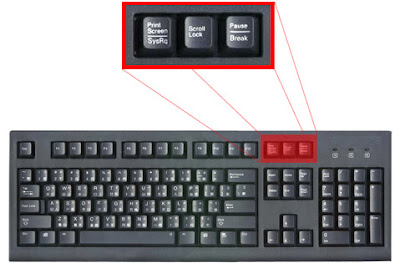

How do it works?
Easy, you just tap the Print Screen (often abbreviated Prt Scr, Print Scrn, Prt Scn, Prt Sc or Prnt Scrn) button. The real function of this key is to make a "snapshot" of your screen. Meanings, it will captured everything shown on your display (monitor) and convert it as an image file. If you have some imaging software such as Paint or Photoshop (or a good word processor), you can then paste it into there and crop, etc.

Tutorial:
1) To capture the whole screen, just hit the Print Screen button on your keyboard.
2) Then, open your imaging software (and a blank page, if you need to - it will depend on your software) and select your "Paste" command (or you can use chortcut key - Ctrl+V ). This should paste an image of your computer screen into the document you're working on. Now you can Save (Ctrl + S) the document to wherever you wish, make sure to name it appropriately so you can easily find it.
3) You can now send this file to anyone via email, use it in a presentation, create your own little book of screenshots showing how to perform a specific task, etc. The possibilities are endless.

Extra: Windows Alt Prt Scr
Now, for those who have read this far, we are going to share another neat little feature of the Windows Print Screen Key. Pressing these keys (Alt + Print Screen) will take a screenshot of the currently selected window, not the entire screen like the normal screenshot function. This allows you to target that specific window that you have open and nothing else. No more cropping those screenshots to grab the content you were after!

Example: The output
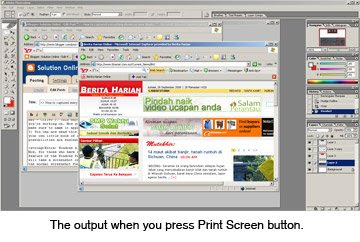
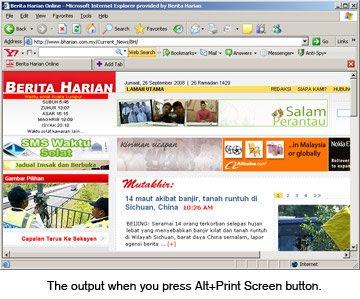


Ok folks, soon you'll be a screenshot master!

Wednesday, September 17, 2008

>> Listen to the Quran Recitation and Translation online in Arabic, English, and Urdu.


Ramadan has a special relationship with the Qur'an, of course: "The month of Ramadan is the one in which the Qur'ân was sent down, a guidance for mankind, clear proofs for the guidance, the Criterion; so whoever amongst you witnesses this month, let him fast it." (Soorah al-Baqarah 2:185)

Therefore, i want to share a good site where you can LISTEN to the Quran Recitation and Translation online in Arabic, English, and Urdu. It's called Quran explorer.com!


What inside Quran explorer.com?

  • Arabic audio recitation from 6 famous Qaris
  • Arabic text with translations in 7 languages
  • Audio Translations in English and Urdu
  • Sura, Verse, Juz, & Qari selection options
  • Easy Navigation and Streaming Audio
  • Easy to read font with adjustable sizes
  • Custom font developed for IndoPak script
  • Automatically Bookmarks your progress
  • Color Coded Tajweed Rules
  • No programs to download


Extra info about Quran Explorer.com
Terkini & Sensasi
Dapatkan berita terkini dan hiburan sensasi di portal khas gabungan akhbar-akhbar online di Malaysia sekarang!
http://malaysianonestopnews.blogspot.com/

Blog archived (by month)

Year(s) Month(s)
2011 Jan - Feb - Mac - Apr - May - Jun - Jul - Aug - Sep - Oct - Nov - Dec
2010 Jan - Feb - Mac - Apr - May - Jun - Jul - Aug - Sep - Oct - Nov - Dec
2009 Jan - Feb - Mac - Apr - May - Jun - Jul - Aug - Sep - Oct - Nov - Dec
2008 Jan - Feb - Mar - Apr - May - Jun - Jul - Aug - Sep - Oct - Nov - Dec
2007 Jan - Feb - Mac - Apr - May - Jun - Jul - Aug - Sep - Oct - Nov - Dec
Related Posts with Thumbnails