Google

The fastest search engine in town! Try it now...

Tuesday, February 5, 2008

>> Download the award-winning Web Browser


The award-winning Web browser from Mozilla is now faster, even more secure, and totally customizable to your online life. Get it now!

Go to >>> http://www.mozilla.com/en-US/products/

Click Firefox button to download the Mozilla browser.

Friday, January 11, 2008

>> Listen to automatic Athan (Azan) at the right time five times a day on you PC

Athan (Azan) 3.3 is the most popular religious software according to download.com. It's allows you to hear automatic Athan (Azan) at the right time five times a day on your PC.

Athan software are a product from Islamic Finder, which is a non-profit organization, is dedicated to serving Islam on the Internet and currently provides information about mosques, Islamic organizations, Islamic centers, and Muslim owned businesses all over the world (our users can also add them).

It also provides prayer times for more than 6 million cities worldwide with quite accurate information about their Qiblah direction, distance from Kaaba (Makkah), longitude, and latitude. Furthermore, it has an Islamic web directory covering all the necessary information about Islam (Islam, The Holy Quran, Hadith, Fiqh and Fatawa, Education, Muslim Family, Islamic History and Biography, Health and Islamic Medicine, Economy and Commerce, and more).

Another service provided by IslamicFinder is the Hijri calendar and Gregorian-Hijri date conversion. The free Athan (Azan) software, which makes you hear the Athan (Azan) from your computer 5 times a day, is another service to Muslim Ummah. In addition to the above-mentioned services, it offers articles on different issues and an Islamic photo gallery of thousands of photos, images, and Eid cards that a user can send to others, too.

IslamicFinder was developed by Wasat alnaseej, which plans to develop different web sites to serve Muslims around the globe.

To download, click the link below:

http://www.islamicfinder.org/athanDownload.php

You can choose either to buy Athan Pro or just Download Athan Basic which is free. Picture below shows you the example page.


After that just follow all the instruction properly. Ok folks, enjoyed it!

Thursday, December 13, 2007

>> Internet Explorer: Clear your drop down address bar


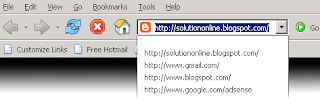
Is your drop down address bar full of old addresses that you will never use again? (Look at the pix above) Mine isn't, because I have fixed that problem by getting rid of them. Want to know how? Then keep reading.

Warning: This tip involves entering the registry. If at any point you get confused or are not completely sure what I mean, STOP , and re-read the steps to make sure you are doing this exactly right. If followed correctly these procedures are completely safe. I would also not recommend messing around in the registry unless you know what you are doing.

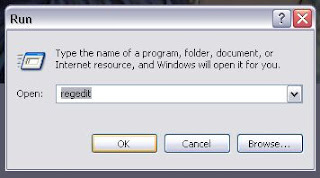
First click the Start button. Then click on Run . Enter " regedit " (no quotes), and click OK . This will bring up the registry editor.


Under the My Computer directory open the HKEY_CURRENT-USER directory by double clicking it. Next open the Software directory in the same way. Under the Software directory open the Microsoft directory. Under Microsoft open the Internet Explorer directory. Under the Internet Explorer directory, open the TypedURLs directory.

Now the section on the right will be filled with a bunch of text that at first may seem rather meaningless, and the address below will be displayed at the bottom of the Window:

" My Computer\HKEY_CURRENT_USER\Software\Microsoft\Internet Explorer\TypedURLs "

If this is the case you are in the right place. If not, go back and make sure you have followed the steps correctly.
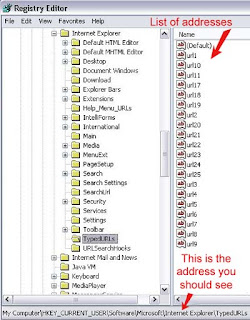


All the entries in the right are actually just a list of all the address you have entered. You can now click on any entry and press delete to get rid of it. For each one you delete you must confirm that you want to delete it by clicking yes in the box that appears. If it is easier for you, you can delete multiple entries at once by selecting them using either a box or the control key.

When you are finished simply close the registry editor window. (Unless you want to see something else you can do in the registry which is explained below) All those useless URLs are gone! Whenever that address bar gets full again, just do the same thing.

Since we are here in the registry let's change the message in the title bar of Internet Explorer. Just go back to the Main directory under the Internet Explorer directory. Now there is some more stuff in that right window. Scroll to the bottom and look for an entry entitled " window title " double click it to change its value.

Enter the text you want to be displayed in the title bar, and click OK . Now you can close the registry editor. If there was no entry named " window title " you can make one. Click on Edit , go to new , and click on " String Value ." Name it window title and set the value as indicated above.
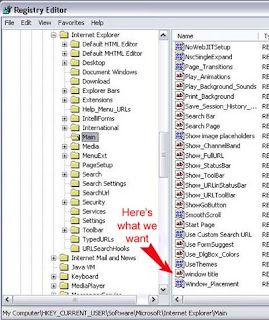


Now open Internet Explorer and you can see your text in the title bar, and all those old addresses are gone!

By Kyle Larson - www.worldstart.com/tips/tips.php/1009

Friday, August 24, 2007

>> Khairul Nisa Homepage are back!!!

Salam... to my dearest friends!

Just for your information...
Khairul Nisa Homepage are back!!!
It's was the first website designed by me...
Just a simple personal site...

If anyone want to leave a message to me or others...
You can use my JOMBORAK message box at
http://asraf.freezope.org

>> My new blog site

Relax for a while bro...
Enjoy read jokes and some great pix on my newest site which is at
http://junkmail4you.blogspot.com

Monday, July 16, 2007

>> Minimize all active windows/app. using shortcut key!

It was just another way to make all your active windows/application minimize synchronously. In Windows 98 & Windows 2000, we can use the 'Show Desktop' button at your 'Quick Launch' toolbar to do this process.
But still not as fast as if you using keyboard 'Shortcut Key' - Windows key + D;
Try to open 4 or 5 windows and do the 'Shortcut Key' above mentioned.
Walla! Pix below shows before & after 'Shortcut Key' process.

Before:

After:


Try it yourself.. you'll enjoyed it!

* Good for hidden your negative activity from mummy & daddy! hehehe...

Sunday, July 15, 2007

>> Need an Antivirus for free?

Go to AVG Website - http://free.grisoft.com/doc/5390/us/frt/0.
Find a link that wrote: AVG Anti-Virus Free Edition 7.5 - Free virus protection for private and non-commercial use only.. (See pix below)


Click the link and start downloading...
After that, execute AVG Antivirus file setup.
That's all!

*Remember always update your virus patent to get a maximum protection!!!

In order to ensure that your AVG is providing the maximum amount of antivirus protection, your AVG System must be kept fully up-to-date. GRISOFT continuously develops new virus detection data. and product improvements. This is all provided to you via Updates.

Pix below shows the updated virus patent that your need to download.

Terkini & Sensasi
Dapatkan berita terkini dan hiburan sensasi di portal khas gabungan akhbar-akhbar online di Malaysia sekarang!
http://malaysianonestopnews.blogspot.com/

Blog archived (by month)

Year(s) Month(s)
2011 Jan - Feb - Mac - Apr - May - Jun - Jul - Aug - Sep - Oct - Nov - Dec
2010 Jan - Feb - Mac - Apr - May - Jun - Jul - Aug - Sep - Oct - Nov - Dec
2009 Jan - Feb - Mac - Apr - May - Jun - Jul - Aug - Sep - Oct - Nov - Dec
2008 Jan - Feb - Mar - Apr - May - Jun - Jul - Aug - Sep - Oct - Nov - Dec
2007 Jan - Feb - Mac - Apr - May - Jun - Jul - Aug - Sep - Oct - Nov - Dec
Related Posts with Thumbnails